Why must a server never store passwords as typed?
Press **Sign up robin** and open the Data view. The members table holds pied-wagtail-42 in plain text. Anyone who ever sees that table can log in as robin: a developer reading the database, a backup that ends up in the wrong place, or an attacker who finds one SQL injection bug. People also reuse passwords, so the damage spreads to their email and bank.
Databases leak more often than anyone plans for. The goal is that a leaked table is still useless for logging in. The server never needs to know a password after sign-up. It only needs a way to tell, at login, whether the typed password is the same one. A hash gives you exactly that.
What does hashing do to a password?
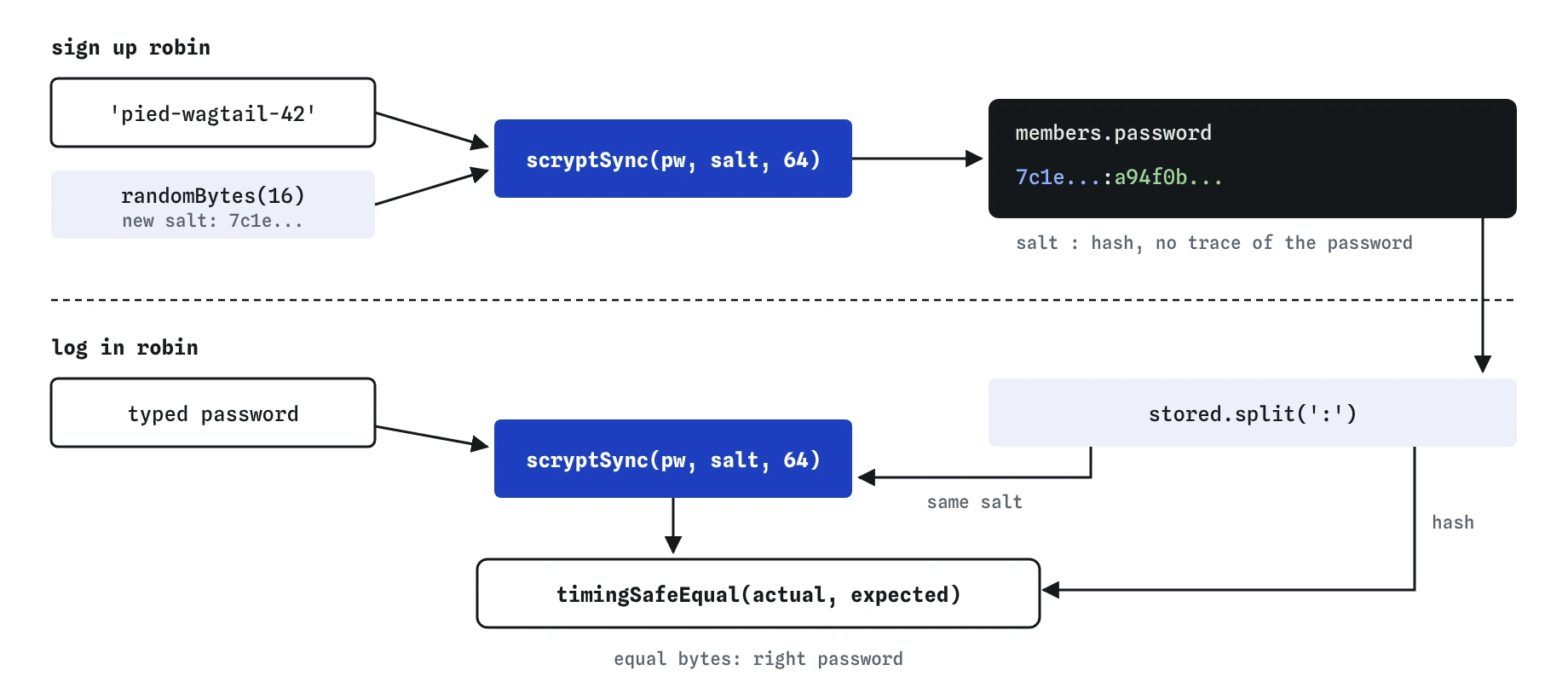
A hash function turns any text into a fixed-length string of bytes. The same input always gives the same output, and you can't run it backwards to recover the input. At sign-up the server stores the hash. At login it hashes what was typed and compares the two results. If they match, the password was right, and the real password was never stored anywhere.
Hashing is different from encryption. Encrypted data can be decrypted by anyone with the key, so encrypting passwords only moves the problem to wherever the key lives. A password hash has no key and no way back.
Hashing fits in front of the session work from the previous lesson. Sign-up hashes and stores. Login looks up the row, checks the password against the hash, and only then creates a session and sets the sid cookie. After that, no request carries the password again until the next login, so the password is handled in exactly two routes, which makes them easy to review.
Why isn't SHA-256 good enough?
SHA-256 is a fine hash for checking files, and a poor one for passwords, because it is fast. A single graphics card can try billions of SHA-256 guesses a second, working through dictionaries of common passwords and every short combination. Most real passwords fall within hours.
Password hashing functions are slow on purpose and use a lot of memory, so each guess costs real time and hardware. scrypt, which Node.js includes as crypto.scrypt() and crypto.scryptSync(), is one of them. Argon2id is the other common choice, usually through a package. Both turn billions of guesses a second into a few thousand.
What is a salt, and why does every password need its own?
Without a salt, two members who choose the same password get the same hash. An attacker can spot those pairs in a leaked table and use huge precomputed tables of common passwords and their hashes to look answers up instantly.
A salt is a random value, created fresh for each password, that is mixed into the hash. crypto.randomBytes(16) gives 16 random bytes, which is plenty. With a salt, robin's and wren's hashes differ even if they chose the same password, and precomputed tables become useless because the attacker would need one for every possible salt.
The salt isn't secret. Store it right next to the hash, for example as salt:hash in one column, because login needs it to repeat the calculation. Its only job is to make every hash unique.
function hashPassword(password) {
  const salt = crypto.randomBytes(16).toString('hex');
  const hash = crypto.scryptSync(password, salt, 64).toString('hex');
  return `${salt}:${hash}`;  // stored in members.password
}
How does login check a hashed password?
Login reads the stored value, splits it into salt and hash, hashes the typed password with that same salt and the same length, and compares the bytes. Buffer.from(hash, 'hex') turns the stored hex back into bytes so both sides have the same form.
Compare with crypto.timingSafeEqual(a, b), never ===. An ordinary comparison stops at the first different character, so a wrong guess that matches more characters takes slightly longer, and careful timing can leak information. timingSafeEqual always looks at every byte. It throws if the two buffers have different lengths, which can only happen here if the stored value is damaged, so keep the key length the same everywhere.
Answer 401 with the same message whether the name or the password was wrong. “Wrong name or password” gives an attacker nothing to work with, while “no such member” tells them which names exist. A careful server also runs a dummy hash when the name isn't found, so both failures take the same time.
function checkPassword(password, stored) {
  const [salt, hash] = stored.split(':');
  const expected = Buffer.from(hash, 'hex');
  const actual = crypto.scryptSync(password, salt, 64);
  return crypto.timingSafeEqual(actual, expected);
}

How does the practice server's scrypt differ from the real one?
The practice server's crypto.scryptSync is a stand-in: it has the same shape and gives the same kind of output, but uses simpler maths so it runs instantly in the browser. Your code is correct for real Node.js. On a real server, the call takes noticeable time and memory, which is the point.
On a real server, two more details apply. The synchronous version blocks every other request while it runs, so a busy site uses crypto.scrypt() with a callback, or wraps it with util.promisify, so other requests keep moving. Node's default scrypt cost (N of 16384) is below what current guidance recommends for passwords. You can raise it with an options object, such as { N: 131072, r: 8, p: 1, maxmem: 256 * 1024 * 1024 }, and the same options must be used for sign-up and login. Store the settings alongside the hash if you might change them later.
How can you check the hashing works here?
Sign robin up, then open the Data view. The password column should hold a long hex string with a colon in it and no trace of pied-wagtail-42. Sign up a second member with the same password and compare the rows: the salts and hashes should both differ.
Then press **Log in robin** and **Wrong password**, and read the status codes in the Requests view: 200 and 401. Read the Log as well. Nothing in it should show a password, a salt or a hash.
What do AI tools get wrong about passwords?
Generated code still reaches for crypto.createHash('sha256') or md5 for passwords, sometimes with one fixed salt written into the code. Both are fast and fall to guessing. Look for a slow function, a new salt per password, and timingSafeEqual in the comparison.
Watch the logging too. AI tools like to add console.log(req.body) while debugging a login route, which writes every password into the Log. Check that error messages don't reveal whether a name exists, that a missing row can't cause a crash, and that the minimum length is sensible. Current NIST guidance asks for at least 15 characters when a password is the only factor (8 when there is a second one), allows at least 64, and drops forced mixes of symbols.
Field notes
- Never store a password as typed, because anyone who sees the table could log in.
- A hash can't be reversed, so you check a login by hashing the attempt again and comparing.
- Give every password its own random salt so equal passwords get different hashes.
- Use a slow function like scrypt, since fast hashes such as SHA-256 are easy to guess at.
Easy to get wrong
SHA-256 is fast and, used like this, unsalted. Equal passwords get equal hashes and guessing runs at billions a second. A slow function with a per-user salt fixes both.
An ordinary comparison can finish early, and the time it takes can leak how much of a value matched. timingSafeEqual checks every byte every time.
Logging the whole body writes the password into the Log, where it is stored and read long after the request. Log the name, never the password.
Questions people ask
Can I recover a member's password if they forget it?
No, and that is the point of hashing. Send a password reset link instead: a random single-use token, stored hashed, that expires after a short time and lets the member choose a new password.
Should I use scrypt or Argon2id?
Both are good choices in 2026. scrypt is built into Node.js, so it needs no extra package. Argon2id is the current first recommendation in many security guides and needs a package. Either is far better than any fast hash.
Does the salt need to be kept secret?
No. It sits next to the hash and is read at every login. Some sites add a separate secret value, often called a pepper, kept outside the database in an environment variable. That is an extra layer, never a replacement for a per-user salt.
Is a hashed password still sent over the network in plain text?
The browser sends the password as typed, and the server hashes it. HTTPS encrypts that request on the way, which is why login pages must only ever run over HTTPS.