What problem do container queries solve?
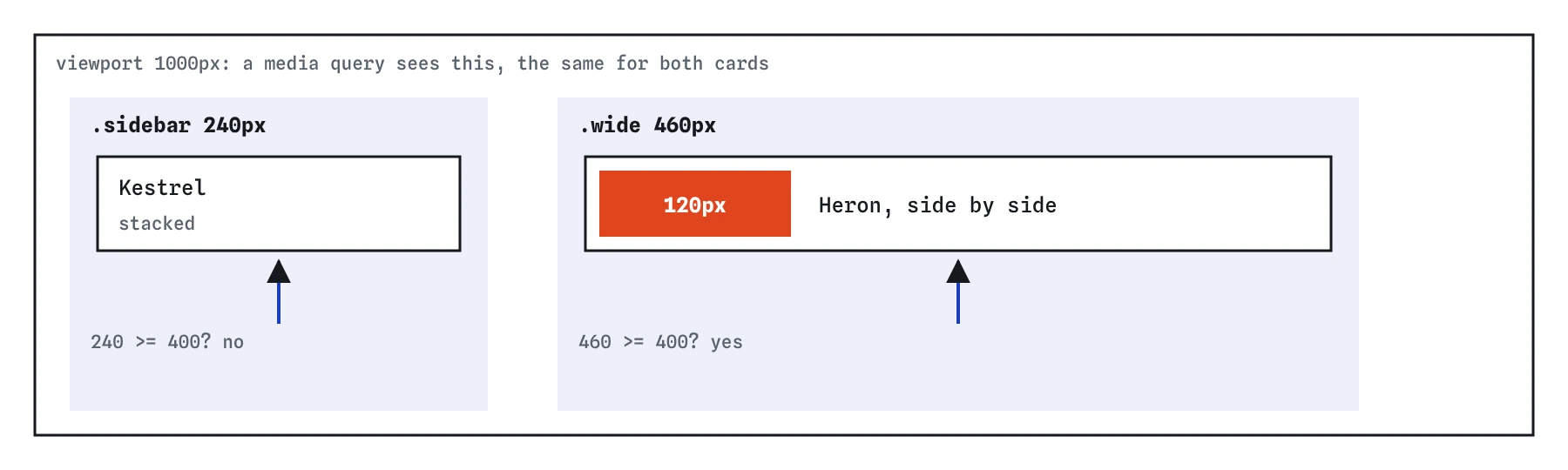
Picture a bird club site with a sighting card. On the home page the card sits in a wide main column, where a photo beside the text looks good. On the species page the same card sits in a 240px sidebar, where it must stack. A media query cannot tell these apart. It only knows the viewport is 1200px wide, which is true for both cards.
A container query lets a component ask how much room its container gives it. The card's CSS says: when my container is at least 400px wide, put the photo beside the text. Drop the card anywhere and it picks the right layout without page-specific overrides.
Container queries are supported in all major browsers since 2023, so you can use them on production sites today.

How do you make an element a container?
Set container-type on the element whose size you want to query. The value you almost always want is inline-size, which lets descendants query its width (its inline size in a left-to-right language). The element must get its width from outside, from its parent or the layout, which block elements, grid areas and flex items already do.
The other value, size, lets you query height too, but it stops the element from sizing to its content in both directions. A size container with no explicit height collapses to zero, which is a classic surprise. Reach for size only for things with a fixed height, such as a panel in an app layout.
Being a container also turns on layout containment for that element. In practice this means it becomes the containing block for its own sizing, so its width cannot depend on the children inside it. That is why the query never loops.
.sidebar,
.main {
  container-type: inline-size;
}
How do you write an @container rule?
An @container rule looks like a media query. The condition uses the same features and the same range syntax: (width >= 400px), (width < 300px) or (min-width: 25em). Inside go ordinary rules, and they apply to elements whose nearest container matches the condition.
The key word is nearest. The browser walks up from each element to the closest ancestor with a container-type, and tests that one. An element cannot query itself, so the rules inside must style descendants of the container, never the container element. If you want the card itself to change, make its wrapper the container.
When no container exists, the query is false and nothing inside applies. That is the most common reason a first container query seems to do nothing.
@container (width >= 400px) {
  .card {
    grid-template-columns: 120px 1fr;
  }
}
Why name a container?
Containers often nest. A card might sit in a grid cell that sits in a main column, and if both are containers, an unnamed query only ever asks the nearest one. Give a container a name with container-name, and a query can target it by name, skipping any containers in between.
The container shorthand sets both at once: the name first, then a slash, then the type. Names are your own words, so pick ones that describe the region, like side or main, and keep them consistent across the site.
A named query never falls back to an unnamed container. If the names do not match exactly, the rules inside never apply, and the browser gives no warning.
.sidebar {
  container: side / inline-size;
}

@container side (width < 300px) {
  .promo {
    padding: 8px;
  }
}
What are cqi units?
Container query units are like viewport units measured against a container. One cqi is 1% of the container's inline size, so 5cqi is 12px in a 240px sidebar and 23px in a 460px section. There are also cqw and cqh for width and height, cqb for block size, and cqmin and cqmax.
Use them for things that should scale with the component: a heading that grows with the card, or padding that tightens in a narrow slot. Wrap them in clamp() so the size never gets too small to read or too big for the layout, for example font-size: clamp(1rem, 4cqi, 1.5rem).
If no container is found, cqi falls back to the small viewport size, which can produce a huge value. When a cqi font size looks enormous, check that an ancestor really has container-type set.
.card h3 {
  font-size: clamp(1rem, 6cqi, 1.5rem);
}
When should you use a container query instead of a media query?
Ask whether the change belongs to the page or to the component. Page layout decisions, such as whether the sidebar sits beside the main column or below it, depend on the viewport, so they stay in media queries. Component decisions, such as whether a card stacks its photo, depend on the space the component lands in, so they go in container queries.
Most responsive sites use both. A media query moves the sidebar below the content on phones, and every card inside adapts on its own because its container changed width. You write the card's layout logic once, next to the card's other styles.
Container queries also suit design systems and reusable components, where the author cannot know which page or column a component will be dropped into.
What are style queries?
Container queries can also test a custom property on the container, written @container style(--theme: dark). This lets a parent flip a mode on all its children by setting one variable. Support is limited: Chrome, Edge and Safari support style queries for custom properties, and Firefox does not yet. Use them only as an enhancement with a working fallback.
Size queries are the stable, well-supported part, and they cover nearly every real layout need.
@container style(--theme: dark) {
  .card {
    background-color: #222;
  }
}
How do you debug a container query?
In Chrome and Firefox DevTools, containers get a container badge in the Elements panel. Click it to highlight the container, and the Styles panel shows each @container condition above the rules it controls, with a link to the container it was tested against.
When a query does not fire, check four things in order. Does an ancestor have container-type? Is the rule styling a descendant and not the container itself? Does a named query match the name exactly? Is the container actually as wide as you think, measured at its content box without padding?
AI tools often write container-type: inline, which is invalid, or put container-type on the very element they then try to restyle inside the query. Both make the query silently do nothing.
Field notes
- Container queries let a card react to the width of its container instead of the window.
- An element becomes a container when you set
container-type, usuallyinline-size. - An
@containerrule uses the same conditions and range syntax as a media query. - Use media queries for page layout and container queries for a component's own layout.
Easy to get wrong
An element cannot query its own size. Make the parent the container and style the child.
A size container ignores its content's height and collapses to zero unless it has a set height. Width queries need only inline-size.
inline is not a valid value, so the declaration is dropped and no container exists.
Questions people ask
Do container queries replace media queries?
No. Use media queries for page-level layout and user preferences, and container queries for components that need to fit the space they are given.
Can I query a container's height?
Yes, with container-type: size, but the container must then get its height from somewhere other than its content.
Is there a performance cost?
Very little for normal pages. Containment actually limits how far layout changes spread, which can help.
Which browsers support container queries?
Size queries and container units work in all major browsers since 2023. Style queries are newer and not in Firefox yet.