What are the link states and what order do they go in?
Links have five states you can style. The :link pseudo-class matches a link the visitor has not visited. The :visited pseudo-class matches one they have. The :hover pseudo-class applies while a pointer is over it, :focus-visible while it has keyboard focus, and :active during the moment it is being pressed.
Write them in the order link, visited, hover, focus-visible, active, often remembered as LVHA. All these selectors have the same specificity, so the one that comes last wins when several match. A link the visitor has visited and is now hovering matches both :visited and :hover; if :visited came last, the hover colour would never show on visited links.
For privacy, browsers only let :visited change colours. Sizes, background images and other properties are ignored, so a page cannot detect which sites you have been to by measuring the layout.
a:link {
  color: #1f5c4a;
}

a:visited {
  color: #5b3f74;
}

a:hover {
  color: #0d3b2f;
}

a:focus-visible {
  outline: 3px solid #e0a96d;
}

a:active {
  color: #b5442c;
}
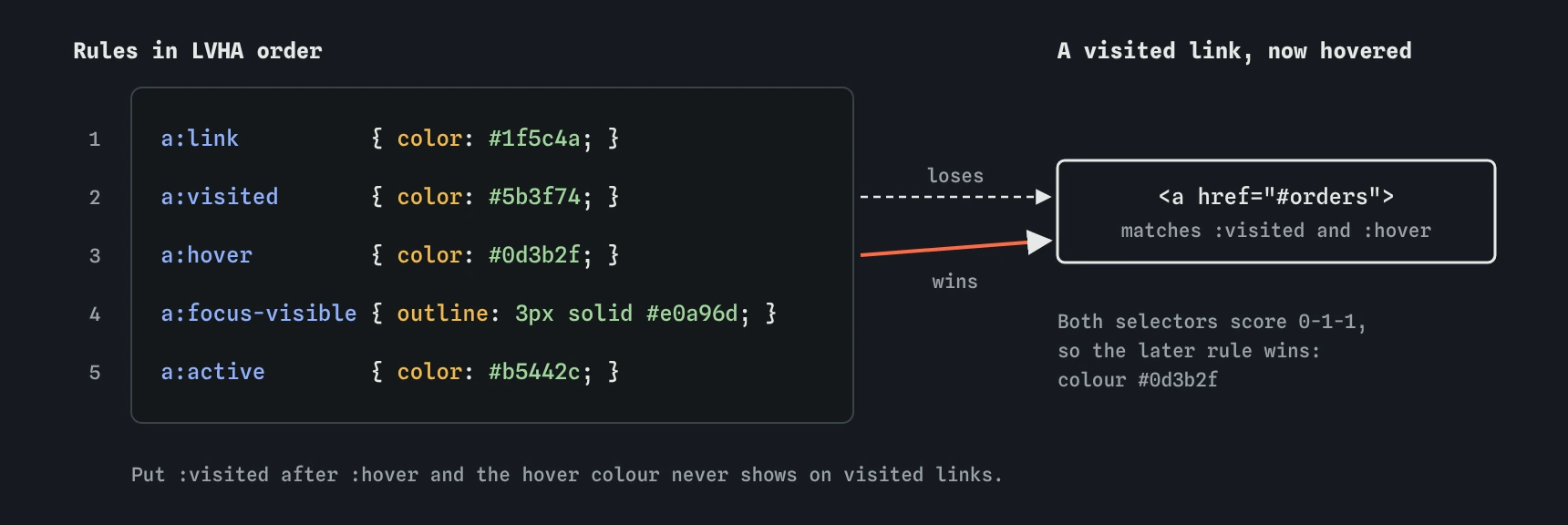
:visited and :hover, and :hover wins because it comes later.Why should links inside text stay underlined?
An underline is the one signal that works for everyone. About one in twelve men has some colour vision deficiency, and a green link in black text can look identical to them. WCAG asks that links in body text be distinguishable by something other than colour, and an underline is the simplest way to meet that.
Navigation is different. A row of short words at the top of the page is recognised as links by its position and layout, so removing the underline there is fine. The risk is copying text-decoration: none from the nav into a global a rule, which strips the underline from every link in every article.
If the default underline looks heavy, restyle it rather than deleting it. A thinner line, a softer colour and a little offset with text-underline-offset keep the signal and look calmer.
.article a {
  text-decoration-thickness: 0.08em;
  text-underline-offset: 0.2em;
}

.site-nav a {
  text-decoration: none;
}
How do you write good focus styles?
Keyboard users press Tab to move from link to link. The focus ring shows where they are. Every browser draws one by default, and outline: none removes it. Removing it without a replacement leaves keyboard users lost on the page, so never do that.
The :focus-visible pseudo-class matches when the browser decides a focus ring is helpful, which in practice means keyboard focus and not mouse clicks. That solves the old complaint that rings appeared after clicking a button. Style :focus-visible with an outline thick enough to see, at least 2px, in a colour with 3:1 contrast against the background. Supported in all current browsers since 2022.
Use outline rather than border for focus. It takes no space, so nothing shifts when focus moves. The outline-offset property moves the ring away from the text so it does not touch the letters. Test it: click in the address bar, then press Tab repeatedly and watch the whole page.
a:focus-visible {
  outline: 3px solid #e0a96d;
  outline-offset: 3px;
  border-radius: 2px;
}
How do you style a link that looks like a button?
A call to action such as "Order a cake" is a link, because it goes to another page. You can make it look like a button with padding, a background and a border radius. Give it display: inline-block so the vertical padding takes space and the box does not split across lines.
Keep the element a link. Use <a> when the action navigates and <button> when it does something on the current page, such as opening a menu or submitting a form. Screen readers announce them differently and they respond to different keys: Enter for links, Enter and Space for buttons.
Give the button-style link visible hover and focus states too. A slightly darker background on hover and the same focus ring as other links keep it consistent.
.cta {
  display: inline-block;
  padding: 10px 18px;
  background-color: #1f5c4a;
  color: #fff;
  border-radius: 6px;
  text-decoration: none;
}

.cta:hover {
  background-color: #0d3b2f;
}
How do list-style-type and list-style-position work?
The list-style-type property sets the marker. Unordered lists default to disc; circle and square are the other classic shapes. Ordered lists default to decimal, and you can choose lower-alpha, upper-roman, decimal-leading-zero and many language-specific counting systems such as japanese-informal. You can also pass a string: list-style-type: "- " uses a dash.
The list-style-position property decides whether the marker hangs outside the item's box (outside, the default) or sits inside it as if it were the first character (inside). With outside, wrapped lines align under the text, which is usually neater. With inside, wrapped lines go back to the left edge, under the marker.
Lists have a default left padding of 40px where outside markers sit. If you remove that padding, outside markers move off the edge of the box and may be cut off.
.ingredients {
  list-style-type: square;
  list-style-position: outside;
  padding-left: 1.2em;
}
How do you style the marker with ::marker?
The ::marker pseudo-element selects the bullet or number of each list item. You can change its color, font-size, font-weight, font-family and content, plus a few animation properties. You cannot give it padding, margins or a background. Supported in all current browsers; Safari only allows colour and font properties, so do not rely on content changes there.
For a bird club checklist you might colour the numbers in the brand red and make them bold, leaving the item text alone. That used to require removing the markers and drawing new ones with ::before; ::marker does it in two lines.
.steps li::marker {
  color: #b5442c;
  font-weight: 700;
}
How do you remove bullets from a navigation list?
Navigation is a list of links, so marking it up as <ul> inside <nav> is correct. It tells screen reader users how many links there are. Then list-style: none, padding-left: 0 and margin: 0 remove the bullets and default spacing, and flexbox lays the items out in a row.
Safari has one quirk. With list-style: none, VoiceOver stops announcing the element as a list. That is a deliberate choice by Apple, aimed at lists used purely for layout. Inside a <nav> it makes little difference, because the landmark already tells people where they are. If you need the list announced, add role="list" to the <ul>.
Do not swap the list for a stack of <div> elements or bare links separated by pipes. You lose the count, and the pipe characters get read aloud.
.site-nav ul {
  display: flex;
  gap: 16px;
  list-style: none;
  margin: 0;
  padding-left: 0;
}
What are CSS counters for?
Counters let CSS number things that are not list items, such as recipe steps written as headings. You create one with counter-reset on a parent, increase it with counter-increment on each item, and print it with content: counter(step) in a ::before. Ordered lists already use a built-in counter called list-item.
Use them for decoration only. Numbers added by CSS are read by most screen readers today, but they cannot be copied in some browsers and they disappear when CSS fails. If the number matters to the meaning, write it in the HTML or use an <ol>.
In AI-generated CSS, watch for a { text-decoration: none; } applied globally, outline: none on :focus, hover styles written before :visited, and navigation built from <div> elements instead of a list. Each of those is a quick fix with a real effect on users.
.method {
  counter-reset: step;
}

.method h3::before {
  counter-increment: step;
  content: "Step " counter(step) ": ";
}
Field notes
- Write link states in the order link, visited, hover, focus-visible, active.
- Underlines keep links visible to people who can't tell colours apart.
- Always keep a clear focus ring for keyboard users.
list-style: noneremoves bullets while the list stays a list for screen readers.
Easy to get wrong
Without a visible ring, keyboard users cannot tell which link is focused. Style the ring for keyboard focus instead of deleting it.
Equal specificity means the later rule wins. With visited last, hovering a visited link shows no change.
A global rule removes underlines from links inside paragraphs too, where colour alone is not enough.
With one colon the selector is invalid and the whole rule is ignored.
Questions people ask
Why can't I change the font size of visited links?
Browsers allow only colour changes on :visited, so pages cannot detect your history by measuring the layout. Use colour, background colour, border colour or outline colour.
Do I still need :focus if I use :focus-visible?
No for current browsers. All of them support :focus-visible. Style :focus-visible and leave the browser's default for anything you do not cover.
How do I use an image as a bullet?
Use list-style-image: url(...), or ::marker with content, or ::before with a background image if you need precise sizing. Make the image decorative; the list structure carries the meaning.
Should hover effects be the only way to show something is clickable?
No. Touch screens have no hover. A link needs to look like a link before anyone touches it.