What do the box-shadow values mean?
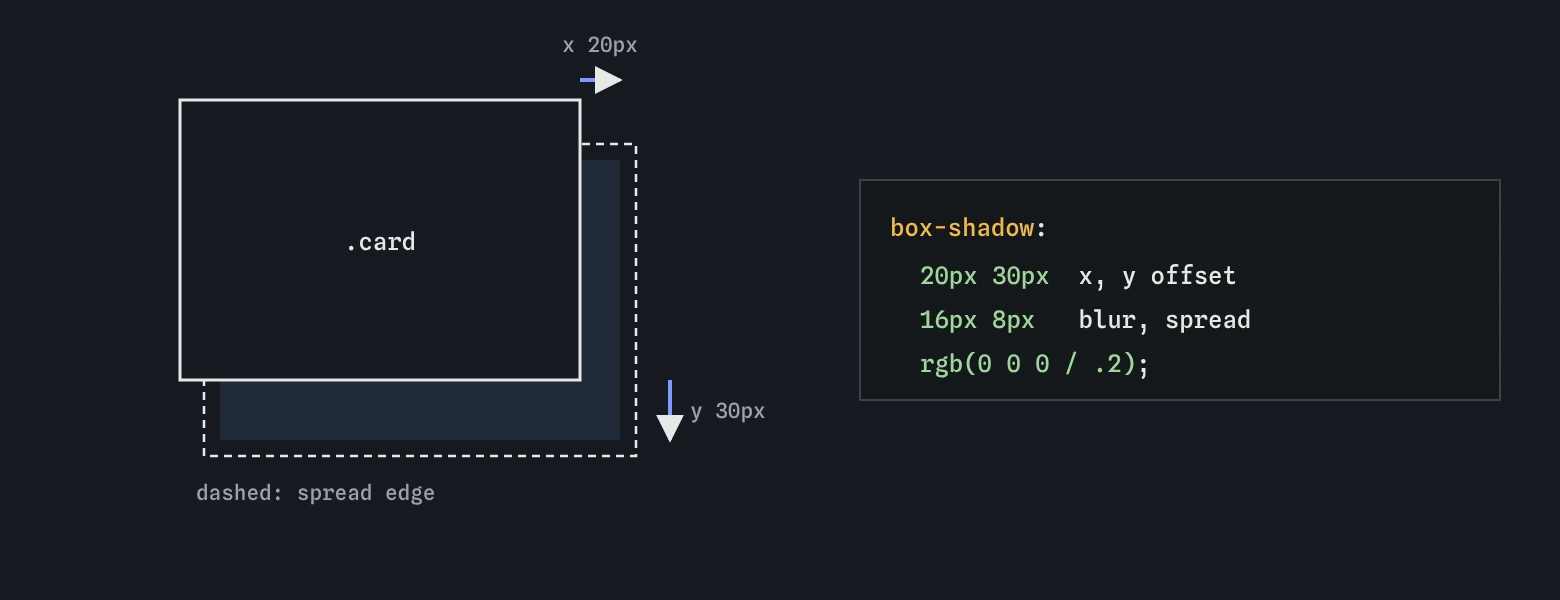
A box-shadow is a copy of the element's border-box shape, painted behind it, moved and blurred. The values come in a fixed order: horizontal offset, vertical offset, blur radius, spread radius, then colour. Only the two offsets are required. box-shadow: 0 4px 12px rgb(0 0 0 / 0.15) means no sideways shift, 4px down, a 12px blur, no spread, and black at 15% opacity.
Positive x moves the shadow right and positive y moves it down, which matches light coming from above and slightly in front, the way most interfaces imagine it. Negative values move it left or up. The blur radius softens the edge: zero gives a hard-edged copy, larger values fade it over a wider band. Blur cannot be negative.
Spread grows the shape on every side before the blur is applied, or shrinks it when negative. A negative spread is useful: 0 8px 16px -8px makes a shadow that appears only along the bottom, because the shrunken shape is hidden behind the box except where the offset pushes it out.
If you leave out the colour, the shadow uses currentColor, the text colour. That is rarely what you want, so always give one.
.card {
  box-shadow: 0 4px 12px rgb(0 0 0 / 0.15);
}

.bottom-only {
  box-shadow: 0 8px 16px -8px rgb(0 0 0 / 0.3);
}
Does a shadow change the layout?
No. A shadow is painted outside the box and takes no space, like an outline. Adding one never pushes neighbours away, so it is safe for hover effects. The flip side is that a large shadow can overlap the next element or be cut off by a parent with overflow: hidden. If a card's shadow looks sliced flat along one side, look for clipping on its container and add some padding there.
Shadows follow border-radius. A card with rounded corners gets a shadow with the same corners, so you never need to match them by hand.
How do you make a shadow look soft and real?
Real shadows are faint, soft and slightly offset downward. The two classic mistakes are dark colours and zero blur. Pure black at full opacity with a small blur looks like a cut-out; rgb(0 0 0 / 0.1) to 0.2 with a blur two to three times the offset looks like an object above a surface.
For more realism, layer shadows. Separate them with commas; the first one listed is drawn on top. A tight, slightly darker shadow sits near the box like the contact shadow under a cup, and a wide, faint one spreads further like ambient shading. Two or three layers is plenty. Raising the y offset and blur together on hover makes the card look like it lifts toward you.
On a coloured background, a tinted shadow looks more natural than grey. Under a card on a warm cream page, a shadow in a dark brown at low opacity blends better than black. Pick the shadow colour from the background's hue, darker and less saturated.
.card {
  box-shadow:
    0 1px 2px rgb(0 0 0 / 0.12),
    0 8px 24px rgb(0 0 0 / 0.08);
}

.card:hover {
  box-shadow:
    0 2px 4px rgb(0 0 0 / 0.12),
    0 16px 40px rgb(0 0 0 / 0.12);
}
When do you use inset shadows?
The inset keyword, written first or last in the shadow, draws the shadow inside the padding box instead of outside the border. The element then looks pressed into the page. That suits input fields, progress tracks, and a button's pressed state on :active.
An inset shadow with zero offset and zero blur and a spread value draws a solid inner line that takes no space. box-shadow: inset 0 0 0 2px #2f6b3c looks like a 2px border but never changes the element's size, which makes it handy for selected states on tiles that must not shift. The same trick without inset draws an outer ring that follows the radius.
.well {
  box-shadow: inset 0 2px 4px rgb(0 0 0 / 0.15);
}

.tile.is-selected {
  box-shadow: inset 0 0 0 2px #2f6b3c;
}
How does text-shadow work?
The text-shadow property takes x offset, y offset, blur and colour, with no spread and no inset. It follows the letter shapes. Like box-shadow, it takes a comma-separated list, and it is inherited, so setting it on a container applies it to all the text inside.
Its best job is readability over images. A soft dark shadow, such as 0 1px 3px rgb(0 0 0 / 0.6), gives white letters a faint halo that separates them from bright patches of a photo. It helps, but it does not replace a tint layer behind the text, and it does not change the contrast ratio that checkers measure.
On plain backgrounds, text shadows mostly make text blurrier. Large decorative headings can carry a subtle one; body text should not have any. Glowing neon titles made of several stacked shadows look fun in a demo and are tiring to read.
.hero h1 {
  color: #ffffff;
  text-shadow: 0 1px 3px rgb(0 0 0 / 0.6);
}
When do shadows add meaning, and when are they decoration?
Shadows suggest height. An element with a larger shadow looks closer to the reader, so it reads as being above the others. Interfaces use that to show layers: a dropdown menu, a dialog or a sticky header casts a stronger shadow than the cards beneath it. Keep a short, consistent scale, for example three levels stored in custom properties, and the depth will make sense.
Shadows used only for decoration tend to multiply until every element floats and nothing stands out. If every card, button and image has a heavy shadow, none of them looks raised. Use them where the height means something, and use a border or a background change for plain grouping.
Do not rely on a shadow alone to show state. In Windows high contrast mode, forced colours remove box shadows, so a selected card marked only by its shadow looks like the rest. Pair it with a border, an outline, or a visible text change.
:root {
  --shadow-1: 0 1px 2px rgb(0 0 0 / 0.12);
  --shadow-2: 0 4px 12px rgb(0 0 0 / 0.12);
  --shadow-3: 0 12px 32px rgb(0 0 0 / 0.18);
}

.menu {
  box-shadow: var(--shadow-3);
}
What is the drop-shadow() filter for?
A box-shadow always follows the rectangle, rounded or not. A transparent PNG of a bicycle, an SVG icon or a speech-bubble shape made with a pseudo-element gets a rectangular shadow that ignores the visible outline. The filter: drop-shadow() function instead follows the actual painted pixels, including transparent gaps.
Its syntax is like text-shadow: drop-shadow(0 4px 6px rgb(0 0 0 / 0.3)). There is no spread and no inset, and it applies to everything inside the element, including text and children. Use it for cut-out images and irregular shapes, and keep box-shadow for ordinary boxes.
.bike-cutout {
  filter: drop-shadow(0 6px 8px rgb(0 0 0 / 0.25));
}
Are shadows slow?
A few static shadows cost almost nothing. Cost grows with blur radius, area and the number of layers, and it is highest when shadows repaint every frame. Animating box-shadow itself during a hover transition makes the browser recompute the blur each frame, which can stutter on low-end phones when many cards animate at once.
A smoother pattern puts the larger shadow on a ::after pseudo-element with opacity: 0, and transitions only the opacity on hover. Opacity changes are cheap. In DevTools, the Performance panel and the Rendering tab's paint flashing show if shadows are repainting more than you expect.
.card {
  position: relative;
}

.card::after {
  content: "";
  position: absolute;
  inset: 0;
  border-radius: inherit;
  box-shadow: 0 16px 40px rgb(0 0 0 / 0.15);
  opacity: 0;
  transition: opacity 200ms;
}

.card:hover::after {
  opacity: 1;
}
Field notes
box-shadowvalues go in order: x offset, y offset, blur, spread and colour.- A shadow takes no space, so it never pushes other elements around.
- Soft shadows use a faint colour, a downward offset and plenty of blur.
- A bigger shadow makes an element look closer and above the others.
Easy to get wrong
Non-zero lengths need units, so the first version is invalid. Solid black is also too harsh for a soft lift.
On a transparent PNG or SVG, box-shadow draws around the rectangle. drop-shadow() follows the visible shape.
Shadows on body text on a plain background blur the letters. Keep them for large text over images.
Questions people ask
Why is my shadow cut off on one side?
A parent has overflow: hidden, overflow: auto or clip, which clips everything outside its padding box, shadows included. Add padding to the parent or move the clipping.
How many shadows can I stack?
There is no practical limit, but two or three layers give realistic results. More layers cost more to paint and rarely look better.
Can a shadow appear on only one side?
Yes. Use a negative spread equal to the blur and an offset toward that side, such as 0 8px 8px -8px, so the shadow only peeks out at the bottom.
Do shadows show in forced colors mode?
No. Windows high contrast mode removes box shadows, so never use a shadow as the only sign that something is selected or focused.