What is wrong with the Spoke and Chain home page?
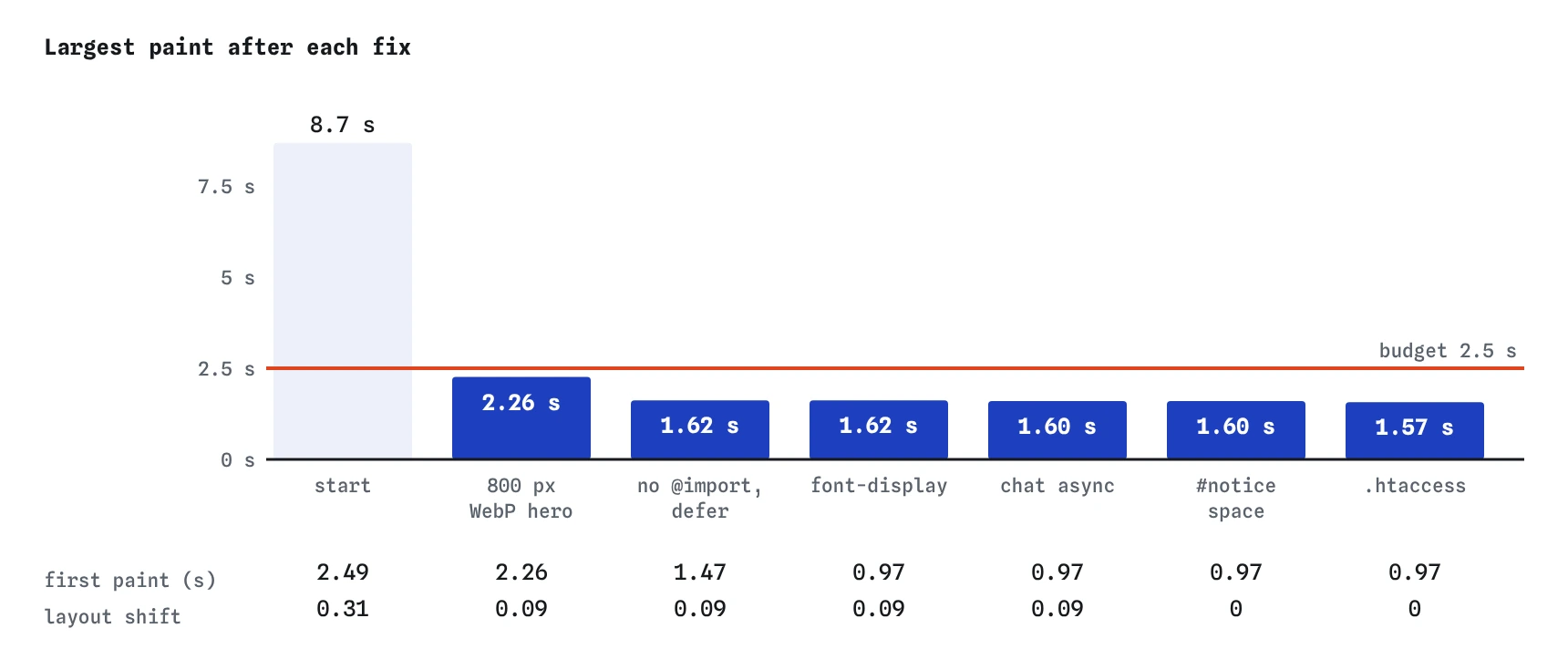
Load the page and read the Vitals first. Largest paint is about 8.7 seconds, layout shift about 0.31, first paint about 2.5 seconds, and the first visit downloads about 1,540 KB. Both Core Web Vitals that can be measured here, LCP and CLS, are in the poor band.
The “Worth fixing” list names most of the causes, the files show the rest, and each one maps to a lesson in the course. Work through them in order of how much waiting they cause, and measure after every change so you know which fix moved which number.
- A 2,400 pixel, 1,200 KB hero photo with no
widthorheight. style.cssstarts with an@import, so a second stylesheet is found late and blocks paint.- The Gear Sans font has no
font-display, so text stays hidden while it loads. slider.jsis a plain script in the head with a 140 ms task.- The chat widget from another site is a plain script that stops the parser.
notice.jsdrops a workshop notice into an empty#noticeand pushes the page down..htaccesshas no compression and no caching rules.
Where should you start?
Start with the largest paint, because it is the worst number and one file causes most of it. The hero is 1,200 KB. On a phone on 4G at about 200 KB per second that is six seconds of downloading on its own, before the connection is shared with anything else.
Point the <img> at /img/shop-hero-800.webp, which is 60 KB, and give it width="800" height="533" so its space is reserved. It is the largest thing on the first screen, so add fetchpriority="high". Do not lazy-load it. That one change brings LCP down by several seconds and removes the bigger of the two jumps.
<img src="/img/shop-hero-800.webp" alt="The shop front with bikes outside"
     width="800" height="533" fetchpriority="high">
What is holding back the first paint?
The Waterfall tags four rows as blocking at the start: style.css, the old-theme.css it imports, slider.js in the head and the chat widget. Nothing can paint until the stylesheets have arrived and the head script has run.
Remove the @import line. The old theme's rules are not used on this page, and an @import means the browser only finds the second file after the first has arrived, adding a whole round trip plus 45 KB to the wait. If some of those rules were needed, the fix would be to copy them into style.css or link both files from the HTML so the preload scanner finds them together.
Add defer to slider.js. The slider is lower on the page and does not need to run before anything shows. With those two changes, first paint comes forward to about 1.5 seconds and style.css is the only file left blocking the first paint. The font fix in the next section takes it under 1 second. That one is fine: a small stylesheet in the head is how the page gets its look on the first paint.
How should the font load?
The @font-face rule for Gear Sans has no font-display, which means the browser's default: hide the text for up to three seconds while the font downloads. On a slow connection visitors stare at a blank page with a photo and no words.
Add font-display:swap. Text shows at once in the fallback, system-ui, and changes to Gear Sans when it arrives. For a brand font on headings that is usually the right trade. If the swap itself looks jarring, optional uses the font only when it arrives within about 100 ms and keeps the fallback otherwise, which avoids any visible change.
Font files keep the same content for years, so they belong in the caching rule later as well. A preload is worth adding only if the Waterfall shows the font starting late and holding back the largest text; on this page the hero is the largest paint, so it is not needed.
@font-face{
  font-family:"Gear Sans";
  src:url("/fonts/gear-sans.woff2") format("woff2");
  font-display:swap
}
What should happen to the chat widget?
The chat widget is 160 KB of JavaScript from another site, written as a plain <script> at the end of the body. The parser stops there until it downloads from a new origin, which needs its own connection, and then it runs a 120 ms task.
Adding async lets the parser finish and the page complete without waiting for it. It still runs a long task when it arrives, and together with the slider's task the Vitals view shows Total Blocking Time of about 160 ms, still in the good band. A stronger fix is a facade: show a small 'Chat with us' button and load the widget only when someone taps it. Most visitors never open the chat, and they would never download it at all.
How do you stop the notice from pushing the page down?
notice.js puts a short message about Monday's stocktaking into the empty <div id="notice"> at the top of the page, about half a second after it runs. Without reserved space the heading, the photo and the booking link all move down when it arrives.
Give #notice a min-height that fits the message on a narrow phone. The notice is two lines of text with padding, about 60 px here, so min-height:90px leaves room to spare. With the hero sized as well, layout shift drops from about 0.31 to zero. Putting the notice straight into the HTML would be even better, since it is the shop's own message and changes rarely.
#notice{min-height:90px}
.notice{background:#ffe9a8;padding:8px}
What should the server rules say?
The .htaccess file starts with only a comment. Add compression for text types first: HTML, CSS and JavaScript shrink to about a third with gzip, and slider.js goes from 90 KB to about 27 KB on the wire. Images barely compress, so leave them out.
Then add caching. Files whose names change when their content changes, or that never change, can be kept for a year with immutable. Here that is CSS, JavaScript, WebP images and fonts. The HTML page itself is always fetched again, so a change to the home page is seen on the next visit. Switch the Waterfall to Second visit: everything except the page and the chat widget comes from the cache, about 1 KB in total.
A year-long cache is only safe if a changed file gets a new name or a new query string, as the cache-busting lesson showed. If the shop edits style.css in place, returning visitors keep the old version for up to a year.
AddOutputFilterByType DEFLATE text/html text/css application/javascript
<FilesMatch "\.(css|js|webp|woff2)$">
  Header set Cache-Control "max-age=31536000, immutable"
</FilesMatch>
How do you know you have finished?
Compare the before and after numbers. Largest paint is about 1.6 seconds, down from about 8.7. Layout shift is zero, down from 0.31. First paint is under 1 second. The first visit is about 290 KB, down from about 1,540, and a second visit is about 1 KB. Every check passes.
Then look at what is left. More than half the remaining weight is the chat widget, and the slider still runs a long task. A performance budget for this page would ask whether either earns its place. On a real site you would also check PageSpeed Insights over the following weeks, because the Chrome UX Report's real-visitor numbers update slowly and are the ones that count.
How is the simulator different from a real audit?
A real audit uses Chrome DevTools and Lighthouse on the live site, and PageSpeed Insights for real-visitor data. Real numbers wobble between runs, include image decoding and the browser's own work, and depend on the visitor's device. The simulator gives the same answer every time and lays everything out as a single phone column, which makes cause and effect easier to see.
The order of work is the same in both: find the largest wait on the way to the main content, remove it, measure again, and repeat until the numbers are inside your budget.
Field notes
- Start with the worst number and the file that causes most of it.
- Remove blocking imports and scripts so only one file holds the first paint.
- Load the chat widget off the critical path with
asyncor a facade. - Add compression and caching rules so a second visit downloads almost nothing.
Easy to get wrong
If the numbers change after seven edits, you cannot tell which edit helped and which hurt. One at a time keeps each decision honest.
The hero is the largest paint. Lazy loading delays it; a smaller file and a higher priority bring it forward.
If the page itself is cached for a year, visitors never see changes to it. Keep long lifetimes for files whose names change with their content.
An @import is found only after its parent sheet arrives, adding a round trip and blocking paint for rules this page never uses.
Questions people ask
Which fix made the biggest difference?
The hero photo. Going from 1,200 KB to 60 KB took most of the seven seconds off the largest paint. On most slow pages, one or two heavy files cause most of the wait.
Why WebP and not the 800 pixel JPEG?
Both would pass. The WebP is 60 KB against 90 KB for the JPEG, with the same pixels, and every browser in use in 2026 supports WebP. AVIF is often smaller again where the server has it.
Should the slider script be removed too?
Perhaps. With defer it no longer blocks the first paint, but it still runs a 140 ms task. If the slider shows only a few photos, CSS scroll snap can do the same job with no script.
What should I do after this course?
Run Lighthouse and PageSpeed Insights on a page you look after, write down its numbers, set a budget, and fix the biggest wait first. Then check the Chrome UX Report data for that page over a month to see the change for real visitors.