Why did the page look fast when it was built?
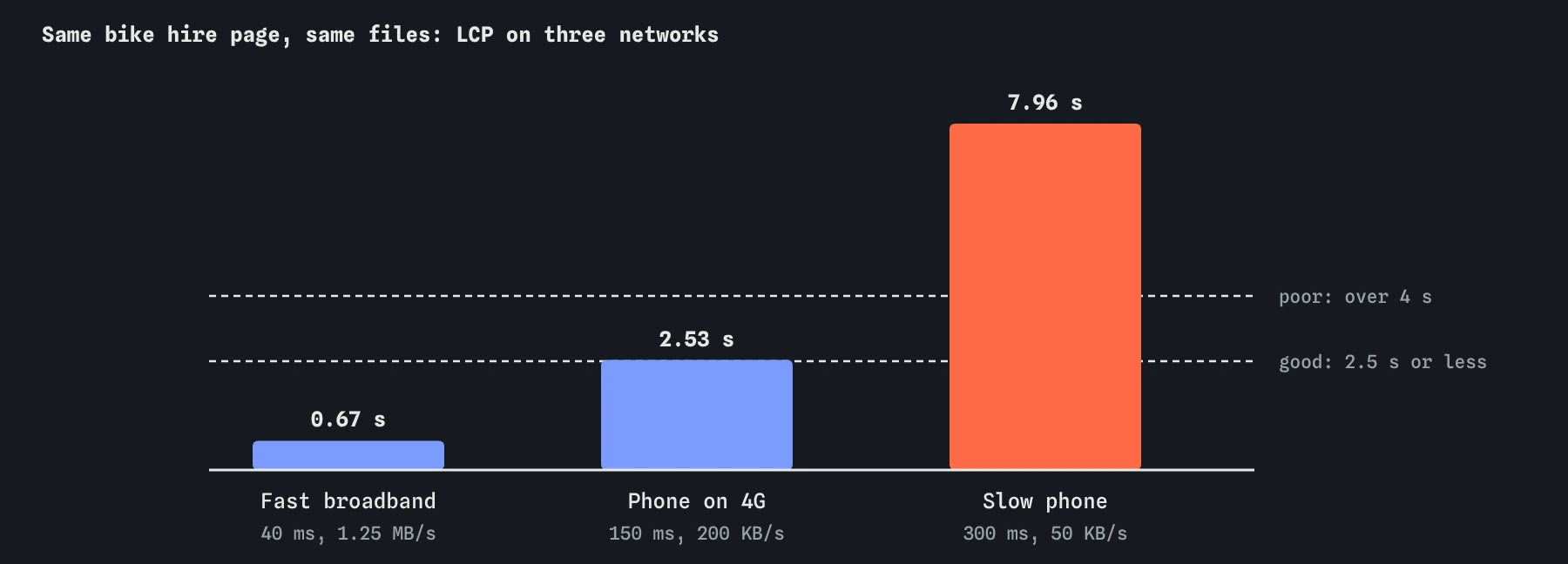
It was built on fast broadband. Switch this lesson's network to fast in your head: 40 millisecond round trips and over a megabyte a second. On that connection the starting page shows its photo at about 0.7 seconds, and nobody would think to fix it. On the slow phone connection this lesson uses, with 300 millisecond round trips and about 50 KB per second, the same page shows its photo at about 8 seconds.
Nothing about the page changed between those two numbers. The difference is all in the conditions. A 260 KB photo is a quarter of a second on fibre and over five seconds on a weak mobile signal, and a three round trip connection is 120 milliseconds on one and nearly a second on the other.
The people who build sites tend to have fast laptops on good connections. Many of the people who visit them have mid-range phones on patchy mobile data, on a bus or in a village shop. A fair test starts from the visitor's side.

What is the difference between lab and field data?
Lab data comes from a test you run under fixed conditions: one device, one network profile, one load. Lighthouse, the DevTools Performance panel and this simulator all produce lab data. It is repeatable, so it is the right tool for checking whether a change helped. Its weakness is that you chose the conditions, and they may not match your visitors.
Field data comes from real visits. Chrome records LCP, CLS and INP for users who allow it, and the Chrome UX Report publishes the results for sites with enough traffic. PageSpeed Insights shows that data at the top of its report, covering the previous 28 days. It is the truth about what visitors experience, but it is slow to change and can't tell you why a number is bad.
Use both. Field data tells you which pages and which numbers need work, and whether a fix helped real people a few weeks later. Lab data lets you find the cause and test a fix in minutes. When the two disagree, the field is right about the experience and the lab is a hint about the cause.
Why does Google use the 75th percentile?
Line up every visit's LCP from fastest to slowest. The median, the middle one, describes a typical visit, but half of visitors had it worse. The 75th percentile is the visit three quarters of the way along: 75 out of 100 visits were at least that fast, and 25 were slower.
Google judges a page as passing a vital when its 75th percentile is in the good range. That choice means a page can't pass on the strength of fast desktop visits alone. If a quarter of your visitors are on slow phones and their LCP is 8 seconds, the 75th percentile sits right among them.
That is why this lesson tests on the slow profile. You don't need every visit to be fast, but you need the slower end of normal to be acceptable. The good line for LCP is 2.5 seconds; on a connection this slow, getting under 4 seconds, out of the poor range, is a realistic first goal.
Which network should you test on?
The simulator has three profiles. Phone on 4G, the default in most lessons, has 150 millisecond round trips and about 200 KB per second. The slow profile here has 300 milliseconds and about 50 KB per second, close to a weak 3G or a crowded mobile cell. Fast broadband has 40 milliseconds and 1.25 MB per second.
Test changes on the profile that is closest to your slower visitors, and glance at the others. In real tools that means using the throttling menu in the DevTools Network panel, or the slow 4G setting Lighthouse uses for mobile tests. Testing only on fast broadband hides almost every loading problem; testing only on the slowest profile can make small wins look unimportant.
Round trips and bandwidth hurt different things. A slow round trip makes every new connection, every redirect and every chained file cost more. Low bandwidth makes every kilobyte cost more. On the slow profile the photo was both large and competing for the link, so making it smaller and giving it priority fixed most of the first visit.
<img src="/img/hire-800.jpg" alt="Three hire bikes outside the shop"
     width="800" height="500" fetchpriority="high">
Why does a second visit behave differently?
A visitor who comes back may already have some of your files. Whether the browser can use them without asking depends on the Cache-Control header the server sent with each file. With a long max-age, the browser reuses the file without any request at all. With no-cache, or with no caching header, it asks the server whether the file has changed; the answer is tiny, but it still costs a round trip.
The starting .htaccess sends no-cache for everything. Switch the Waterfall to Second visit: every file is checked again, each with a 300 millisecond round trip, and the photo shows at about 1.8 seconds. After adding a year-long max-age for CSS, JavaScript and images, those rows are tagged “from cache”, only the page itself goes to the server, and the photo appears at about 1.4 seconds.
The page itself is still fetched every time, which is what you want: it is the file that names everything else, so it must be current. A later lesson on fingerprinted file names explains how to cache the other files for a year and still ship changes the same day.
# Spoke and Chain server rules
Header set Cache-Control "no-cache"
<FilesMatch "\.(css|js|jpg)$">
  Header set Cache-Control "max-age=31536000, immutable"
</FilesMatch>
How do you make a lab test fair?
Pick conditions on purpose and write them down: device, network profile, first or second visit. Compare before and after under the same conditions, and change one thing at a time so you know which change moved the number.
Real browsers vary between runs, so run a real lab test three to five times and look at the middle result. Close other tabs, turn off browser extensions, which can add their own scripts, and test in a private window so a warm cache doesn't hide a slow first visit. For a second visit test, load the page once, then load it again without clearing the cache.
This simulator gives the same numbers every time, which is why it is useful for learning. Real tools won't, and a change of 50 milliseconds in one run of Lighthouse is usually noise.
Where does the simulator differ from real visits?
Real networks wobble: a signal drops, a cell gets crowded, a request needs resending. Real phones also differ in processor speed, which this simulator doesn't model beyond script time. Real caches can be cleared by the browser to save space, and with no caching header at all, real browsers sometimes guess how long a file can be kept; the simulator always checks with the server instead.
The broad picture holds: on slow connections bytes and round trips dominate, and a second visit is only as fast as your caching headers allow.
What does AI often get wrong about measuring speed?
AI answers often quote a single Lighthouse score as proof a page is fast, with no mention of which device or network it was measured on. They also mix up lab and field numbers, or suggest that a score of 90 on a desktop run means the mobile vitals pass.
On caching, generated .htaccess files frequently set no-cache or very short max-age values on everything, or set a year on the HTML page too, which stops visitors seeing updates. Check what each rule matches, and look at the second visit before trusting it.
Field notes
- A page that is fast on office broadband can be very slow on a weak phone signal.
- Lab tests are repeatable; field data shows what real visitors got.
- A second visit can reuse files if the server allows caching.
- Change one thing at a time under the same conditions, and write them down.
Easy to get wrong
On fast broadband this page shows its photo in 0.7 seconds; on a slow phone it takes about 8. Your slower visitors decide the 75th percentile.
If the page itself is cached for a year, returning visitors may not see new content or new file names until their cache expires.
A warm cache can make any page look fast. Changing two conditions at once hides which one made the difference.
Questions people ask
Why doesn't my PageSpeed Insights page show field data?
The Chrome UX Report only publishes data for pages and sites with enough real Chrome visits. Smaller sites may see data for the whole site only, or none at all, and must rely on lab tests.
How long does field data take to change after a fix?
PageSpeed Insights shows a rolling 28 days, so a fix shows up gradually over about four weeks as old visits drop out.
Which is better to measure, the median or the 75th percentile?
Track both if you can. The median describes a typical visit; the 75th percentile is what Google uses and keeps the slower visitors in view.
Does a second visit matter if most visitors are new?
It helps anyone who browses more than one page. The CSS, scripts and logo cached on the first page are reused on the next one, which is a second visit in all but name.