Why does JavaScript cost more than its file size?
An image of 300 KB costs download time and very little else. A script of 300 KB costs the same download time, and then the phone has to read it, compile it and run it, all on the main thread, the one lane that also handles taps, scrolling and drawing. While a script runs, the page cannot respond to anything.
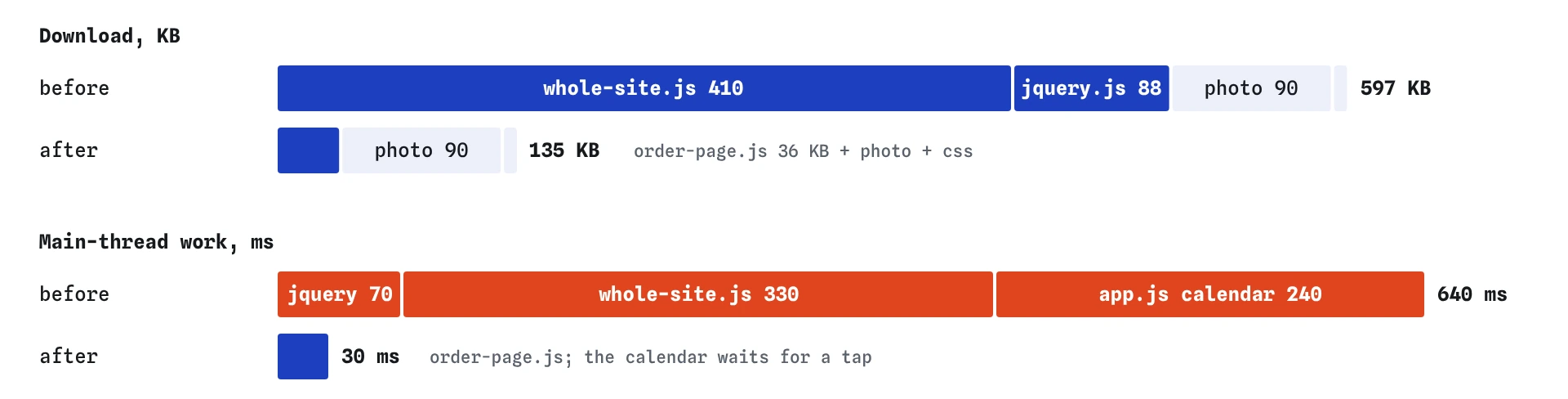
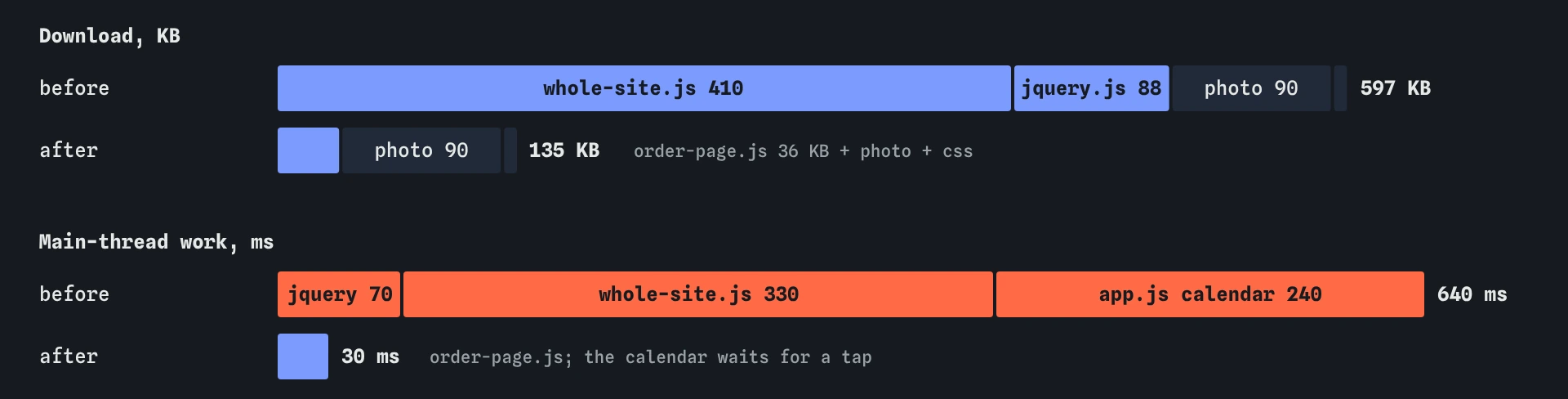
Mid-range phones are much slower at this than laptops. Code that runs in 40 ms on a developer's machine can take 200 ms or more on a three-year-old phone. The simulator gives each script an ms value for that run time. On the bakery's order page, jQuery takes 70 ms, the whole-site bundle takes 330 ms and the calendar in app.js takes 240 ms. Every one of them is a long task, meaning a single stretch of work over 50 ms.
That is why removing JavaScript usually helps twice. Fewer bytes reach the phone sooner, which helps the photo and the text, and fewer milliseconds of running keep the page responsive. Total Blocking Time (TBT) in the Vitals view adds up the part of every task over 50 ms after the first paint. It starts at about 490 ms here.
How do you find a library nothing uses?
Read the page's own code and look for the library's name. jQuery code calls $( or jQuery(. A date library is called by its name. If you search app.js and every other script you wrote and find no call, the library is dead weight. On this page nothing mentions $, so all 88 KB of jQuery can go.
Libraries often outlive the code that used them. Someone added a slider in 2019, the slider was removed in 2022, and the script tag stayed in the shared header because nobody was sure what else depended on it. The safe way to find out is to remove it and test the pages that load it. The browser console reports an error such as $ is not defined straight away if something did need it.
In Chrome DevTools, the Coverage panel (open the command menu with Ctrl+Shift+P and type Coverage) records a page load and shows how much of each script actually ran. A file that shows 98% unused after you have clicked through the page is a strong candidate for removal or for splitting.
<!-- Before: loaded on every page, used by none -->
<script src="/js/jquery.js" defer></script>

<!-- After: the line is gone -->
What is wrong with one bundle for the whole site?
Build tools combine scripts into bundles so the browser makes fewer requests. That is sensible up to a point. The problem starts when one bundle holds the code for every page: the gallery, the blog comments, the wholesale order form and the checkout. Someone visiting the order page downloads and runs all of it, and uses perhaps a tenth.
The bakery's /js/whole-site.js is 410 KB and runs for 330 ms. The server also has /js/order-page.js, which holds only what this page needs: 36 KB and 30 ms. Swapping one for the other is called code splitting. Most build tools do it for you if each page has its own entry file, and many split shared code into a common chunk so it is downloaded once and cached.
A good test for any bundle: open the page, look at what it actually does, and compare that with the size of its scripts. A page with one form and one button rarely needs more than a few tens of kilobytes of script.
How do you run a feature only when someone asks for it?
Some code is needed on this page, just not yet. The collection-day calendar is a good example. The starting app.js builds every day for the next six months the moment it loads, which takes 240 ms, even though most visitors never open the calendar and those who do want the next week or two.
Move that work inside the click handler. The page loads with almost nothing to do, and the cost is paid only by the people who tap Choose a day, at the moment they ask. Building two weeks instead of six months makes that moment quick too: 40 ms is well under the 200 ms that counts as a good response.
On a real site the same idea works for the code itself, with a dynamic import(). The browser downloads the module only when the line runs, so the calendar's code never reaches visitors who do not open it. The simulator does not download modules this way, so here the waiting code stays in app.js and only its running is delayed. The effect on the main thread is the same.
document.querySelector('#pick-day').addEventListener('click', async function () {
  // On a real site: download the calendar code now, not at page load
  const { buildDays } = await import('/js/calendar.js');
  buildDays(14);
});
What does the waterfall show before and after?
Before the change, the Waterfall has three script rows. jQuery and the whole-site bundle together are about 500 KB, and they share the connection with the photo, which is why the photo arrives at about 2.4 seconds. The main-thread tasks list shows three tasks over 50 ms, the first at about 2.3 seconds when jQuery arrives and the last ending at about 4.5 seconds.
After the change, there are two script rows, the order page's 36 KB and your own small app.js. The page weighs about 135 KB in total. The photo arrives at about 1.6 seconds because it no longer competes with half a megabyte of code, and TBT is zero. The first paint barely moves, because defer was already keeping these scripts out of the way of the first paint. Deferring a script moves when it runs. It does nothing to how much it costs.
Is a smaller library always better than a big one?
Smaller is better when it does what you need. Many sites load a large utility library for two or three functions that the browser now provides itself. Formatting a date in the visitor's language is built in with Intl.DateTimeFormat. Finding elements is document.querySelector. Fetching data is fetch. Each of those replaces code you would otherwise ship.
Be careful with swaps that look small and are not. A library that loads a second file, a set of language packs or a stylesheet after it starts can end up bigger than the one it replaced. Check the Waterfall after any swap and add up everything the new library brought with it.
The cheapest code is the code you delete. Before choosing between two libraries for a feature, ask whether the feature needs to be on this page at all, and whether a plain HTML element would do. A <details> element opens and closes without any script, and a form with required checks its own fields.
// Built into the browser, no library needed
const day = new Intl.DateTimeFormat('en-GB', { weekday: 'long', day: 'numeric', month: 'long' });
day.format(new Date()); // "Saturday 24 October"
How do you check this on a real site?
In Chrome DevTools, the Network panel with the JS filter lists every script and its transferred size. Sort by size and question the biggest files first. The Performance panel records a page load and shows long tasks with a red corner, each labelled with the script that ran. Lighthouse lists "Reduce unused JavaScript" with an estimate of the savings for each file, and PageSpeed Insights shows the same check online.
Lab tools measure one load on one simulated device. Real visitors use slower and faster phones, so check the Chrome UX Report data in PageSpeed Insights for Interaction to Next Paint too: heavy scripts that run during loading are a common reason taps feel slow in the first few seconds.
What does AI-written code often get wrong here?
AI assistants reach for libraries out of habit. Ask for a date shown in British format and you may get a date library added to the page. Ask for a carousel and you may get a slider library plus jQuery to drive it. Each suggestion looks reasonable alone, and together they add hundreds of kilobytes to a page that needed a few lines of plain JavaScript.
AI code also tends to set everything up at page load: every modal, every tab panel, every chart, whether or not the visitor will see it. When you review a script it wrote, look for work done at the top level of the file, and ask whether it could wait for a click, for the element to scroll into view, or for the page that actually shows it.
Finally, AI speed advice often says "add defer" and stops there. That keeps scripts out of the first paint, which is good, but a deferred 400 KB bundle still downloads, still competes with your images and still blocks taps while it runs. The bigger win is usually removing or splitting the code.
Field notes
- A script costs download time, then phone time to read, compile and run it.
- Search your own code for a library's name to check if anything uses it.
- One bundle for the whole site makes every page pay for every page's code.
- Run a feature's code when someone asks for it, instead of on page load.
Easy to get wrong
Adding defer to a huge bundle only moves its cost to later. The phone still downloads 410 KB and runs it for 330 ms while the visitor is trying to use the page.
Most visitors never open most features. Running their setup at load time makes everybody wait for code that only a few of them use.
An unused script costs every visitor on every page. A missing one shows up at once as an error in the console, so it is quick to find and put back if it was needed.
Questions people ask
How much JavaScript is too much?
There is no single number, but a content page such as a bakery's order page rarely needs more than 50 to 100 KB of compressed script. Set a budget for your own pages and check it in the Waterfall or the Network panel whenever you add something.
Does compression make big scripts fine?
Compression cuts the download a lot, often to a quarter of the size. The phone still has to unpack and run the full script, so main-thread time stays the same. Compress, and still ship less.
Is `type="module"` faster than a normal script?
Modules are deferred by default and let the browser load only the pieces you import, which helps with splitting. A large module is still large. The saving comes from what you leave out.
Why does removing scripts make the photo faster?
All the files on a page share one connection. Half a megabyte of JavaScript downloading at the same time as the photo takes bandwidth the photo could have used, so the photo finishes later.