What does compression do to a file on its way to the phone?
Your server keeps site.css on its disk at 110 KB. When a phone asks for it, the server can send those bytes as they are, or it can squeeze them first with a compression method that the browser knows how to undo. The phone downloads the smaller version, unpacks it in a few milliseconds, and ends up with exactly the same 110 KB file. Nothing is lost: compression for the web is lossless.
The handshake is automatic. Every browser sends an Accept-Encoding header with each request that lists what it can unpack, typically gzip, deflate, br, zstd. If the server compresses the reply, it adds a Content-Encoding header saying which method it used. You don't change your HTML at all. The whole change lives in the server's settings.
Text compresses well because it repeats itself. A stylesheet says color, margin and font-size hundreds of times; a script repeats function, return and its own variable names. Compression replaces each repeat with a short reference back to the first copy.
Why does the bakery page send 341 KB?
Open the Waterfall before you change anything. Four requests: the HTML at under 1 KB, site.css at 110 KB, order.js at 160 KB and the photo, loaves.webp, at 70 KB. None of the text rows carries a compression tag, and the Vitals view lists both big files under Worth fixing as sent uncompressed.
The stylesheet blocks the first paint, so its 110 KB decide when anything appears: about 1.7 seconds on this pretend 4G phone. The script is deferred, so it doesn't hold back the paint, but it still competes with the photo for the same connection. The photo ends up as the largest paint at about 2.2 seconds.
Real sites often look exactly like this after a move to a new host. The pages work, nothing looks broken, and every visitor downloads two or three times more than they need to without anyone noticing.
How do you turn on gzip or Brotli in .htaccess?
Apache compresses responses with output filters. DEFLATE is gzip, from the mod_deflate module, which almost every host has. BROTLI_COMPRESS is Brotli, from mod_brotli, available in Apache 2.4.26 and later. AddOutputFilterByType applies a filter to every response of the content types you list, so one line covers the whole site.
The content types are the ones the server sends, so they must be spelled exactly. HTML is text/html, CSS is text/css, JavaScript is application/javascript (some servers use text/javascript, and listing both does no harm), and SVG is image/svg+xml. JSON is application/json if your site serves data files.
If your host may lack Brotli, you can keep both lines. Wrap the Brotli line in <IfModule mod_brotli.c> and the gzip line in <IfModule mod_deflate.c>. A browser that accepts Brotli gets Brotli; older clients fall back to gzip. A line for a module the server lacks, written without the IfModule guard, causes a 500 error for the whole site, which is a fast way to learn which modules you have.
# Compress text files on the way out
<IfModule mod_brotli.c>
  AddOutputFilterByType BROTLI_COMPRESS text/html text/css application/javascript image/svg+xml
</IfModule>

# Fallback for hosts without mod_brotli
<IfModule mod_deflate.c>
  AddOutputFilterByType DEFLATE text/html text/css application/javascript image/svg+xml
</IfModule>
How much smaller do the files get?
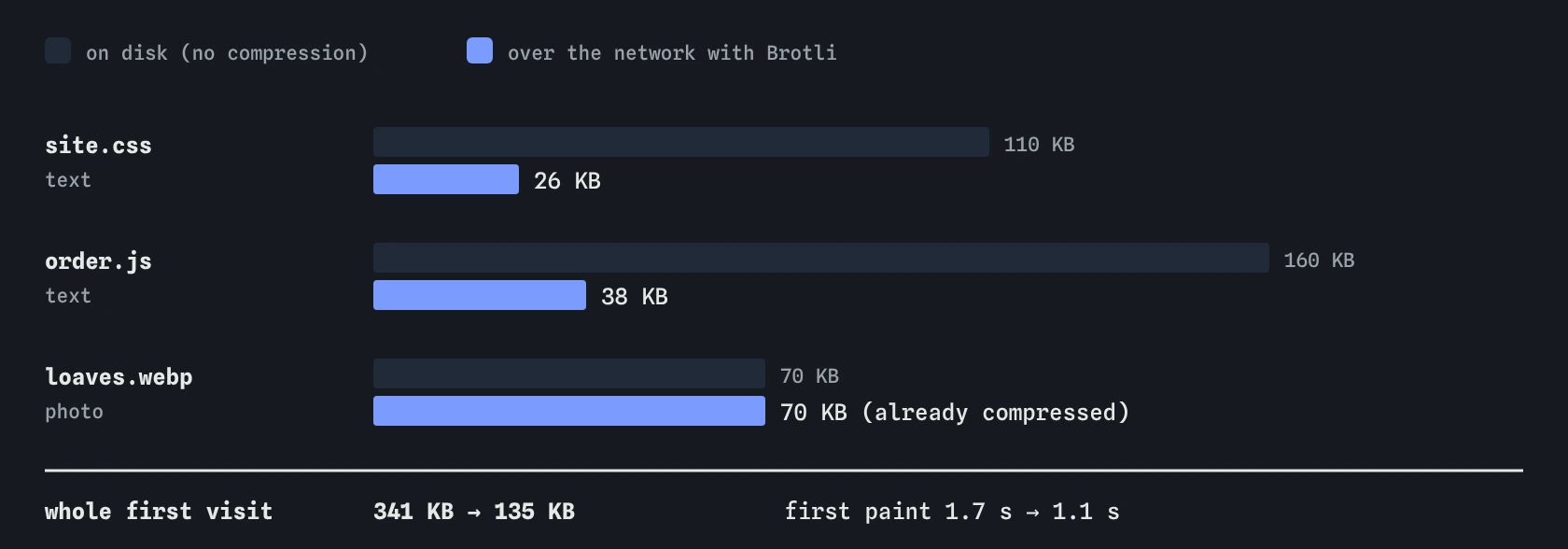
In the simulator, gzip brings text down to 30% of its size and Brotli to 24%. Those are typical figures for real CSS and JavaScript; very repetitive files do even better, and tiny files do worse because there is little to repeat. After the change, site.css crosses the network as about 26 KB and order.js as about 38 KB.
The whole first visit drops from 341 KB to about 135 KB. First paint moves from about 1.7 seconds to 1.1, because the blocking stylesheet arrives sooner. The photo paints at about 1.6 seconds instead of 2.2, even though it did not shrink at all: it has less text to share the connection with.
Brotli usually beats gzip by 15 to 25% on text. Browsers only offer Brotli over HTTPS, which every real site should be using anyway. If your host only has gzip, take gzip: the jump from nothing to gzip is far bigger than the step from gzip to Brotli.

Why are photos left off the list?
JPEG, WebP, AVIF and PNG files are compressed already, by methods designed for pictures. Running gzip over them finds almost no repeats, so the file shrinks by a few percent at most and sometimes grows. The server still spends processor time on every request, and the browser spends time undoing it.
Fonts in WOFF2 are the same: Brotli is built into the format. Video and audio are too. The rule of thumb is to compress text and leave media alone.
SVG is the exception that catches people out. It looks like an image, but inside it is XML text, and real SVG files often shrink by two thirds or more. Add image/svg+xml to the list. The simulator compresses SVG like any other text file, and the Vitals view flags one sent without compression.
Does compression make the script run faster?
No. Compression changes how many bytes cross the network, and nothing else. Once order.js arrives and is unpacked, the phone holds the full 160 KB of JavaScript and has to parse and run every byte of it. On a mid-range phone that can mean a long task on the main thread, and the Vitals view still shows one here.
That is why compression and shipping less code are separate jobs. Compression is nearly free and you should always turn it on. Cutting the script itself is harder work, and it is the only thing that makes the main thread less busy.
Minifying, which removes spaces and comments and shortens names, is also separate. It helps a little on top of compression, because compressed spaces were already cheap. A minified but uncompressed file is usually larger than an unminified compressed one.
How do you check compression on a real site?
In Chrome DevTools, open the Network panel and reload. Right-click the column headers, open Response Headers and turn on Content-Encoding. Each text file should show br or gzip. The Size column shows two numbers when you hover or enable large request rows: the bytes transferred and the size of the resource after unpacking. A big gap between them means compression is working.
Lighthouse and PageSpeed Insights flag text files sent without compression and estimate the savings. If you change .htaccess and see no difference, check three things: that the host allows .htaccess overrides at all, that the module is loaded, and that a CDN in front of your server isn't caching the old uncompressed copies.
Also check that the server sends Vary: Accept-Encoding. Apache adds it for you with these filters. It tells caches between you and the visitor to keep separate copies for browsers that can and can't unpack each method.
What do AI answers get wrong about compression?
AI assistants often produce an .htaccess block that lists every content type they can think of, including image/jpeg and image/png. That costs processor time for no gain. Others still suggest mod_gzip, an Apache 1.3 module from the early 2000s that modern hosts don't have.
Another common mix-up is treating minification as compression, or suggesting a build step that makes .gz files when the server is already compressing on the fly. Both can work, but doing both by accident can send a file compressed twice, which the browser can't read.
Check any suggested lines the way you checked them here: make the change, reload with DevTools open, and confirm the Content-Encoding column. A single typo in a content type, like a missing letter in javascript, fails silently.
Field notes
- Compression shrinks files on the way, and the browser unpacks them.
- Gzip uses
DEFLATE; Brotli usesBROTLI_COMPRESSin Apache. - Text files like HTML, CSS and JavaScript often shrink to a third or less.
- Leave images off the list, because they are already compressed.
Easy to get wrong
Photos are already compressed, so gzip saves almost nothing on them and spends processor time on every request. SVG is text inside and belongs on the list.
A directive from a module that isn't loaded makes Apache return a 500 error for every page. Guard optional modules with IfModule and keep a gzip fallback.
Minification removes spaces and comments; compression removes repetition. Compression saves far more on its own, and the two work together.
Questions people ask
Should I choose gzip or Brotli?
Use Brotli where your host supports it and keep gzip as the fallback. Every current browser accepts both over HTTPS. Brotli files are usually 15 to 25% smaller than gzip for the same text.
Does compressing on every request slow the server down?
Slightly, and for typical page sizes it is far less than the time saved on the network. Very busy sites pre-compress static files once at deploy time and let the server pick the ready-made copy.
My host uses a CDN. Do I still need these lines?
Many CDNs compress text for you, often with Brotli. Check the Content-Encoding column in DevTools on the live site. If it already shows br, the .htaccess lines are a harmless backup for requests that reach your server directly.
What about zstd?
Zstandard is a newer method that recent Chrome and Firefox versions accept. Apache has no standard module for it yet, so on an Apache host Brotli is the practical choice in 2026.